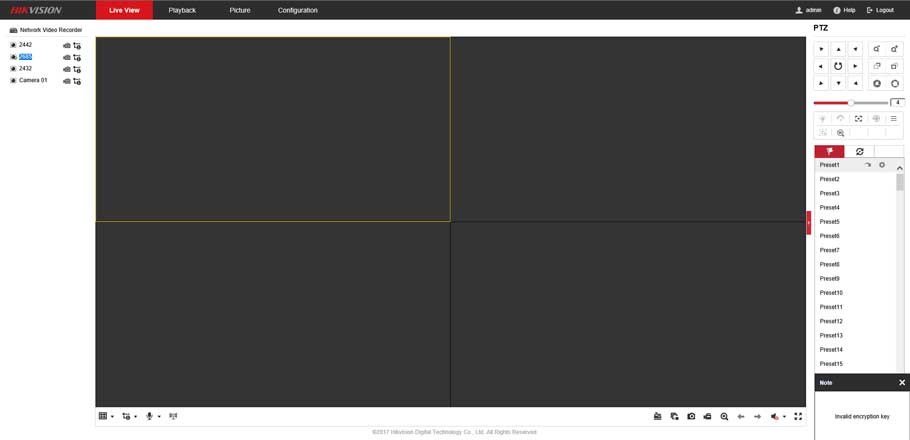
Hata mesajı:
"Akış şifreli. Şifreleme Anahtarını ayarlamak ve canlı görüntüyü yeniden başlatmak için lütfen Yerel Yapılandırma arayüzüne gidin."
Canlı Görünüm'de HikVision kameralarından video akışlarına erişmeye çalışırken ekranınızın sağ alt köşesinde bir açılır pencere olarak görülür.
 Navigate to Configuration --> Advanced Settings --> and set the encryption key (verification code).
The 'key' that you need to enter is actually the "Verification Code" that you set when you enabled and set up the Platform Access for Hik-Connect.
i.e. the Verification code that you entered here:
Navigate to Configuration --> Advanced Settings --> and set the encryption key (verification code).
The 'key' that you need to enter is actually the "Verification Code" that you set when you enabled and set up the Platform Access for Hik-Connect.
i.e. the Verification code that you entered here:
 You need to enter this verification code / encryption key via the web browser of any PC (even on the same LAN) that you wish to access the NVR from.
You will need to enter the code / key here:
You need to enter this verification code / encryption key via the web browser of any PC (even on the same LAN) that you wish to access the NVR from.
You will need to enter the code / key here:
 You then need to disable encrypted streaming on the recorder itself.
This can only be done (enabled/disabled) via a monitor directly connected to your NVR.
You will need to navigate to Configuration --> Network --> Access Platform and un-tick "Enable Stream Encryption".
Artık web tarayıcınızda "canlı görünümü" görebilmeniz gerekir.
You then need to disable encrypted streaming on the recorder itself.
This can only be done (enabled/disabled) via a monitor directly connected to your NVR.
You will need to navigate to Configuration --> Network --> Access Platform and un-tick "Enable Stream Encryption".
Artık web tarayıcınızda "canlı görünümü" görebilmeniz gerekir.
Etiketler:
A
Admin
ACME GÜVENLİK ekibinden güvenlik sistemleri uzmanı
Önceki Yazı
Yoosee Wifi Camera Ayarları
Sonraki YazıIP Kamera/DVR/NVR Için Hareket Algılama E-Posta Alarm Ayarı
İlgili Yazılar
07.02.2024 •
20 dk
Xmeye Dvr Sistemi kurulum ve Kullanım
Xmeye Dvr Sistemi kurulum ve Kullanım , XMEye, IPC ve DVR için video izleme yazılımıdır. Bulut teknolojisi ile, canlı görüntü izleme videosunu Android telefona göstermek ve buna göre işlem yapmak için
14.10.2023 •
10 dk
O-KAM Pro kamera Nasıl Kurulur
20.10.2021 •
8 dk
Bosch Cloud VMS'ye kamera nasıl eklenir?